
INDAIA Workspace
The command centre of your business.
Jobs, clients, deadlines and team in one place. Everyone knows what's theirs to do and you see how everything is going without asking. And we set it up for you, made to measure.
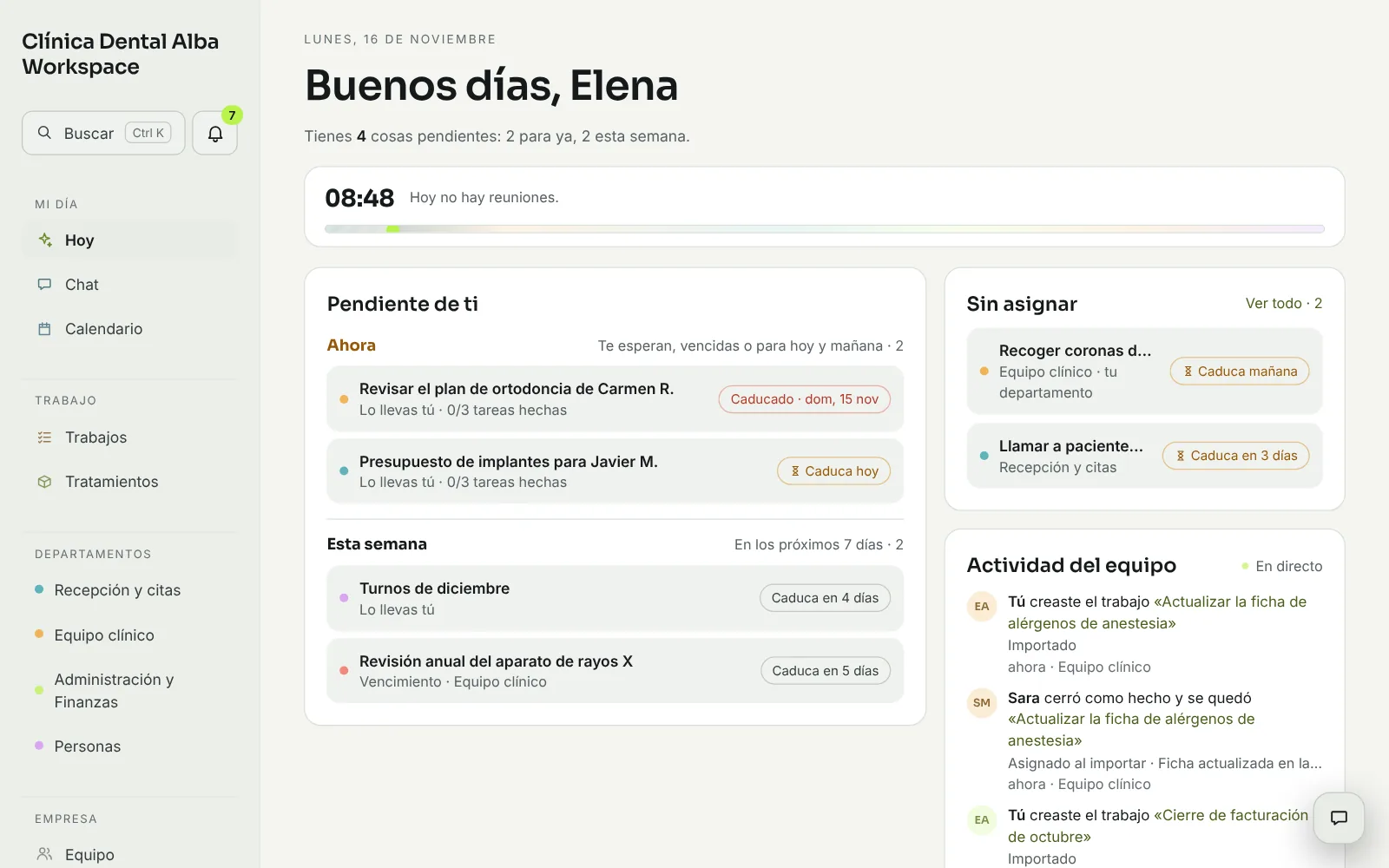
Sample businesses, people and figures. Screens shown in Spanish. INDAIA Workspace is also available in English.
How many things in your business depend on someone remembering?
It's your company, in order.
It's not another program to learn. It's your company, in order.
What's yours today
Everyone opens “Today” and sees their own work, and what's overdue.
Every job has an owner
Who has it, by when and what's missing. Without chasing anyone.
It warns you in advance
Contracts, insurance, inspections and documents warn you before they expire.
Every client, well looked after
Their next step in view, whoever is handling them.
How the week is going
Weekly and monthly reports without asking anyone for data.
Made to measure for your business
Your departments, your brand, your own words and permissions by role. More than 20 sectors to start from.
What it does
It starts already set up
More than 20 sectors to start from. We pick yours and adjust it with you: departments, people and access for the whole team.
Jobs with an owner
Board, timeline and list. Tasks, conversation and documents inside every job.
Clients and deadlines
A file for each client with their next step, and key dates that warn you ahead of time.
Chat, calendar and files
For the whole company and for each department, with its own wall to ask for reviews.
Your brand, your modules, your words
Name, colour and logo. Switch off what you don't use. “Patients”, “Students” or “Members”, whatever you call them.
Six languages, and on mobile
Spanish, English, French, Portuguese, Italian and German, with a light or dark theme. Installs as an app.
How we get started
You book your free consultation
You tell us how you work: how many you are, what slips through and what you use today. We advise you with no commitment.
We work out together how to adapt it
We show it working with a business in your sector and decide what yours needs.
We set it up for you
Your brand, your departments, your people and the permissions for each role. Then we stay by your side.
Frequently asked questions
Do I need to be technical?
No. We set it up for you. And if you want to change something later, you do it from the web: name, logo, modules, departments, people and permissions by role.
How much does it cost?
It depends on the size of your team and what you switch on. We give you the price after your free consultation, with no commitment.
Can I use it for patient data?
It is not a clinical data system: it's for organising the team and the work, not for storing health data.
If I switch a module off, do I lose its data?
No. It disappears from the menu and search, but its data is still there if you switch it back on.
The command centre of your business.
We advise you and work out together how to adapt it to your business.
Book your free consultation